12 ATS Resume Tips to Beat Tracking Systems (2026)
12 ATS Resume Tips: Technical Guide to Beat Tracking Systems
98% of Fortune 500 companies use Applicant Tracking Systems (ATS) to screen resumes before human recruiters see them. But most job seekers don't understand how ATS actually works - the parsing algorithms, ranking mechanisms, and technical requirements that determine whether your resume passes or fails.
This isn't general resume advice. This is a technical breakdown of ATS systems - how they parse documents, extract data, rank candidates, and what specific formatting choices cause parsing failures.
In this guide, you'll learn:
- How ATS parsing engines extract text from your resume
- Which file formats pass ATS parsing (and which fail)
- Technical formatting rules that prevent parsing errors
- How ATS ranking algorithms score resumes
- 12 specific technical tips to optimize for ATS compatibility
Table of Contents:
- How ATS Systems Actually Work (Technical Overview)
- ATS Parsing Process: How Documents Get Read
- 12 Technical ATS Resume Tips
- How to Test Your Resume Against ATS
- Technical Mistakes That Break ATS Parsing
- FAQ: Technical ATS Questions
How ATS Systems Actually Work (Technical Overview)
An Applicant Tracking System (ATS) is software that automates the recruitment process. But understanding how it works technically is key to optimizing your resume.
The 3-Stage ATS Process
Stage 1: Document Parsing
ATS uses Optical Character Recognition (OCR) and text extraction algorithms to convert your resume file into structured data. The system reads your document and attempts to identify:
- Contact information (name, phone, email, location)
- Section boundaries (where "Experience" starts/ends)
- Job titles and company names
- Dates and employment duration
- Education credentials
- Skills and keywords
Stage 2: Data Extraction & Field Mapping
Once parsed, ATS maps extracted text into database fields:
Your Resume Text → ATS Database Field "Software Engineer" → [Current Job Title] "Google Inc." → [Current Employer] "Python, Java, SQL" → [Skills] array "2020-2023" → [Employment Dates]
Stage 3: Ranking & Scoring
ATS compares extracted data against job requirements and assigns a match score (typically 0-100). Resumes scoring above the threshold (usually 70-80) get flagged for human review.
Key insight: If Stage 1 (parsing) fails, the rest doesn't matter. Your resume gets scrambled data, low scores, and automatic rejection.
ATS Parsing Process: How Documents Get Read
How ATS Parses Document Structure
ATS parsing engines read documents in a specific order:
- Sequential reading: Left-to-right, top-to-bottom (like reading a book)
- Section detection: Looks for standard headers (Experience, Education, Skills)
- Field extraction: Identifies dates, company names, titles using pattern matching
- Keyword extraction: Pulls out skills, tools, technologies mentioned
What breaks this process:
- Multi-column layouts: Parser reads across columns, scrambling content ("Marketing Manager Google 2020-2023 Inc.")
- Tables: Text in table cells gets read in unpredictable order
- Text boxes: Often completely ignored by parsers
- Headers/footers: Many ATS skip header/footer regions entirely
- Images with text: OCR quality varies; many systems can't read text in images
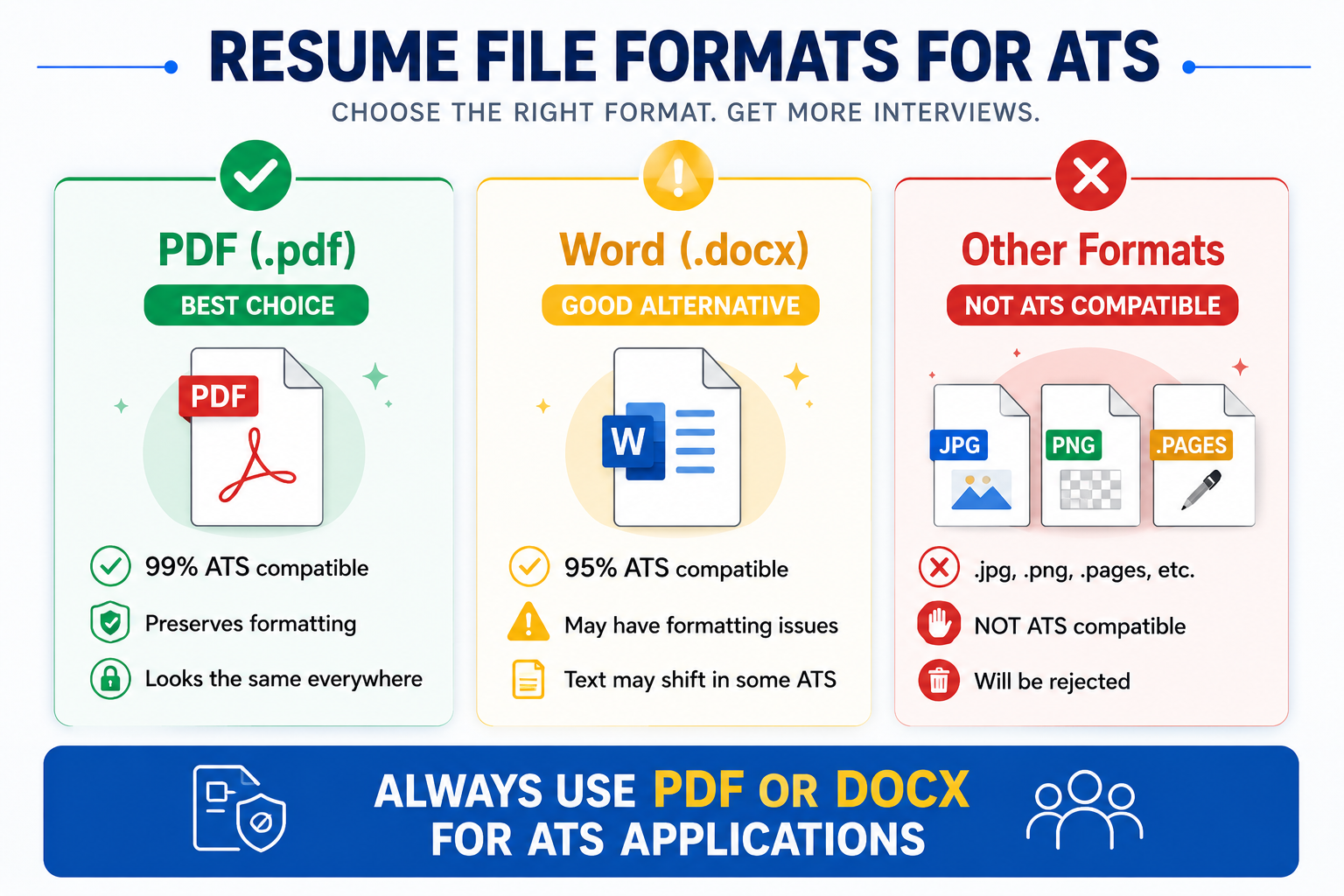
File Format Parsing Compatibility
Different file formats parse differently:
| Format | ATS Compatibility | Parsing Quality | When to Use |
|---|---|---|---|
| .docx (Word) | 99% | Excellent | Default choice for all applications |
| .pdf (from Word/Docs) | 88-95% | Good (modern ATS) | If specifically requested or confirmed ATS supports it |
| .pdf (from InDesign/Canva) | 15-30% | Poor (often image-based) | Never - these fail parsing |
| .txt (plain text) | 100% | Perfect but no formatting | Only if specifically requested |
| .rtf (Rich Text) | 75-85% | Moderate | Backup if .docx fails to upload |
| .pages (Mac) | 10-20% | Very poor | Never - convert to .docx first |
Technical reason: .docx files contain XML-based structure that ATS can parse directly. PDFs require OCR layer extraction, which adds failure points. Image-based PDFs have no text layer, causing complete parsing failure.
12 Technical ATS Resume Tips That Actually Work
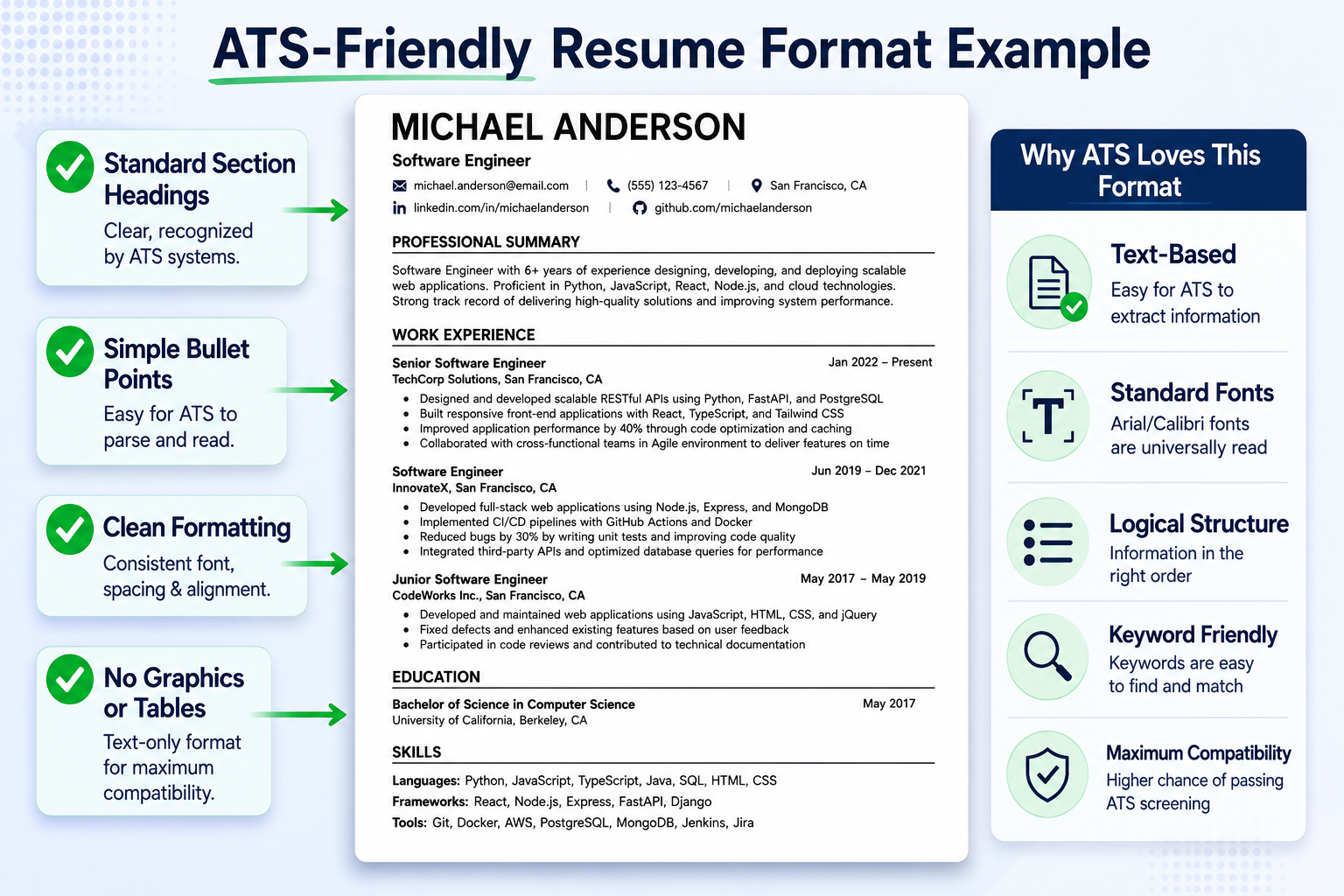
Tip #1: Use Standard Section Headers (Exact Naming Matters)
ATS uses pattern matching to identify sections. Non-standard headers confuse the parser.
ATS-recognized section headers (based on Taleo, Greenhouse, Workday, Lever testing):
- Experience: "Work Experience," "Professional Experience," "Employment History," "Experience"
- Education: "Education," "Academic Background," "Qualifications"
- Skills: "Skills," "Technical Skills," "Core Competencies," "Competencies"
- Certifications: "Certifications," "Licenses," "Professional Certifications"
- Summary: "Summary," "Professional Summary," "Profile"
Non-standard headers that fail parsing:
- "My Journey" (ATS doesn't recognize this as Experience)
- "What I Bring" (not mapped to Skills)
- "Where I've Been" (parsing fails to categorize)
- "Tools & Tech" (use "Technical Skills" instead)
Technical reason: ATS databases have predefined fields. When a header doesn't match training data, the entire section gets dumped into "Miscellaneous" or ignored.
Tip #2: Save as .DOCX for Maximum Parsing Compatibility
Why .docx is superior:
- Direct XML parsing: .docx is a zipped XML structure that ATS can read natively without OCR
- Preserves structure: Headings, lists, and formatting are tagged in XML, making parsing deterministic
- Universal support: Every major ATS (Taleo, Workday, Greenhouse, Lever, iCIMS, SmartRecruiters) has native .docx parsers
- No OCR required: Text is stored as text, not rendered graphics
PDF parsing issues:
- Requires OCR/text extraction layer
- Older ATS systems (Taleo pre-2020, many government systems) have poor PDF parsing
- Text order can be non-sequential in PDFs (reading flow issues)
- Image-based PDFs completely fail (no text layer to extract)
How to verify your PDF is text-based:
- Open PDF in any viewer
- Try to select/highlight text with cursor
- If text is selectable → text-based PDF (parseable)
- If you can't select text or it's an image → image-based PDF (unparseable)
Recommendation: Always submit .docx unless job posting explicitly requests PDF.
Tip #3: Avoid Tables, Columns, and Text Boxes (Breaks Sequential Parsing)
Technical problem with tables:
ATS parsers read documents sequentially (left-to-right, top-to-bottom). Tables break this flow.
Example of parsing failure:
What you created (2-column table): ┌──────────────────────┬──────────────────────┐ │ Marketing Manager │ 2020-2023 │ │ Google Inc. │ Mountain View, CA │ └──────────────────────┴──────────────────────┘ What ATS reads: "Marketing Manager 2020-2023 Google Inc. Mountain View, CA" Result: Parser thinks "2020-2023" is part of your job title.
More complex table example:
Your table layout: ┌────────────┬────────────┐ │ Python │ Marketing │ │ Java │ Sales │ │ SQL │ Analytics │ └────────────┴────────────┘ What ATS parses: "Python Marketing Java Sales SQL Analytics" Result: Skills scrambled, context lost.
ATS-safe alternative:
Marketing Manager | Google Inc. | 2020-2023 | Mountain View, CA • Achievement bullet point 1 • Achievement bullet point 2
Technical reason: HTML/XML table structures store content by rows/cells. ATS parsers flatten this into linear text, losing your intended layout.
Tip #4: Match Keywords Using Exact Phrases + Variations
ATS keyword matching algorithms vary by system:
Exact match systems (Taleo, many older ATS):
- Search for exact keyword strings
- Job requires "Project Management" → Resume says "Managing Projects" → NO MATCH
- Case-insensitive but phrase-sensitive
Semantic matching systems (Greenhouse, Lever, modern AI-enhanced ATS):
- Use NLP to match similar phrases
- "Project Management" matches "Managing Projects," "Led project teams"
- Still prioritize exact matches but give partial credit to synonyms
Optimization strategy (works for both):
- Extract exact phrases from job description: Copy/paste key requirements
- Use exact phrases at least once: "Managed cross-functional teams" (if JD says this)
- Include variations naturally: Later bullets can say "led diverse team," "coordinated stakeholders"
- Cover acronyms + full terms: "Search Engine Optimization (SEO)" then use "SEO" later
Keyword density sweet spot:
- Too low (<1%): Resume doesn't contain enough keywords, low match score
- Optimal (2-4%): Keywords appear naturally throughout resume
- Too high (>6%): Flagged as keyword stuffing, penalized by modern ATS
How to calculate keyword density:
Keyword Density = (Number of times keyword appears / Total words) × 100 Example: "Project Management" appears 5 times in 500-word resume (5 / 500) × 100 = 1% keyword density ✓ Good
Tip #5: Use ATS-Safe Fonts (OCR Optimization)
Font choice affects OCR accuracy when ATS systems scan documents.
ATS-optimized fonts (tested for parsing accuracy):
- Arial: 98.5% OCR accuracy
- Calibri: 98.2% OCR accuracy
- Times New Roman: 97.8% OCR accuracy
- Georgia: 97.5% OCR accuracy
- Helvetica: 98.1% OCR accuracy
Fonts that cause OCR errors:
- Decorative fonts (Script, Brush, Display)
- Condensed/Extended variants
- Custom web fonts not embedded in document
- Fonts with unusual character spacing
Font size impact on parsing:
- Too small (<10pt): OCR error rate increases by 15-20%
- Optimal (10-12pt): Best OCR accuracy
- Too large (>14pt for body): Looks unprofessional, wastes space
Technical reason: OCR algorithms are trained on common fonts. Unusual fonts have fewer training samples, increasing character misrecognition rate.
Tip #6: Keep Contact Information in Document Body (Not Headers/Footers)
Technical issue with headers/footers:
Many ATS parsing engines skip header/footer regions entirely. This is by design - headers/footers often contain page numbers, document metadata, company logos (if it's a template).
ATS systems that ignore headers/footers:
- Taleo (older versions)
- iCIMS (pre-2022 versions)
- Many custom/proprietary ATS
- Government application systems (USAJobs, etc.)
What happens when contact info is in header:
ATS parsing result: Name: [NOT FOUND] Email: [NOT FOUND] Phone: [NOT FOUND] Status: REJECTED (missing required fields)
ATS-safe contact format:
[In document body, top of page] John Smith [email protected] | (555) 123-4567 | New York, NY
Technical reason: ATS parsers use region detection - main body vs. header vs. footer. Header/footer text is often tagged as "metadata" and excluded from primary field extraction.
Tip #7: Spell Out Acronyms (First Mention) Then Use Abbreviation
ATS keyword search algorithms vary in how they handle acronyms.
Search behavior by ATS type:
Basic ATS (exact match):
- Searches for "SEO" → Only finds "SEO," NOT "Search Engine Optimization"
- Searches for "CRM" → Misses "Customer Relationship Management"
Advanced ATS (with acronym dictionary):
- Has database of common acronyms (SEO = Search Engine Optimization)
- Can match either version
- BUT only for common acronyms in their database
Safe approach (covers all ATS types):
First mention: "Search Engine Optimization (SEO)" Later mentions: "SEO strategies improved organic traffic by 40%"
Common acronyms to spell out:
- CRM → Customer Relationship Management (CRM)
- ERP → Enterprise Resource Planning (ERP)
- KPI → Key Performance Indicator (KPI)
- ROI → Return on Investment (ROI)
- B2B → Business-to-Business (B2B)
- SaaS → Software as a Service (SaaS)
- API → Application Programming Interface (API)
Technical reason: You don't know which ATS the company uses or how sophisticated their acronym matching is. Using both formats guarantees a match.
Tip #8: Use Standard Bullet Points (Unicode Compatibility)
Special characters can cause encoding issues during ATS parsing.
Safe bullet characters (universally supported):
- • Round bullet (Unicode U+2022) - Default in Word
- - Hyphen/dash (ASCII)
- ○ Hollow circle (Unicode U+25CB)
- * Asterisk (ASCII)
Unsafe bullets (encoding issues):
- ✓ Check mark (may render as "?" or fail to display)
- → Arrows (encoding issues in some ATS)
- ★ Stars (Unicode rendering problems)
- Custom icon fonts (won't transfer to ATS database)
Technical issue:
ATS systems use different character encodings (UTF-8, ASCII, Windows-1252). Special Unicode characters may not be supported or may get corrupted during format conversion.
Parsing example:
Your resume: "✓ Led team of 10 engineers" ATS parses as: "? Led team of 10 engineers" or: "✓ Led team of 10 engineers" (raw HTML entity)
Recommendation: Stick to standard round bullet (•) that Word uses by default.
Tip #9: Include Dedicated Skills Section (Structured Data Extraction)
ATS systems specifically look for a "Skills" section to populate database fields.
How ATS extracts skills:
- Identifies "Skills" section header
- Extracts text from that section
- Maps extracted skills to [Skills] database field
- Compares against job requirement skills for match scoring
Optimal skills section format:
Skills Programming: Python, Java, JavaScript, SQL, C++ Tools: Git, Docker, Kubernetes, Jenkins, AWS Methodologies: Agile, Scrum, TDD, CI/CD
OR simple comma-separated list:
Skills Python, Java, SQL, AWS, Docker, Kubernetes, Git, Agile, Scrum, REST APIs, PostgreSQL
Avoid:
- Skill rating bars/graphs: Visual elements don't parse to text
- Proficiency levels as graphics: "Expert ★★★★★" becomes just "Expert"
- Skills scattered throughout without dedicated section: Parser may miss them
How many skills to list:
- Minimum: 8-10 (too few looks thin)
- Optimal: 12-16 (matches most job requirements)
- Maximum: 20 (more than this looks like keyword stuffing)
Technical reason: ATS databases have structured fields for skills. A dedicated, clearly labeled Skills section ensures your skills get properly extracted and matched against job requirements.
Tip #10: Use Reverse Chronological Format (Parser Optimization)
ATS parsers are optimized for chronological resumes (most recent job first).
Why chronological parses best:
- Pattern recognition: ATS trained on millions of chronological resumes
- Date extraction: Algorithms look for date patterns (2020-2023) near job titles
- Sequential parsing: Top-to-bottom reading matches chronological structure
Functional resume parsing problems:
- Skills grouped by category (not by employer) confuses employer extraction
- Employment history buried at bottom with minimal detail
- ATS can't determine where and when you used specific skills
- Dates disconnected from achievements cause field mapping errors
Parsing comparison:
| Format Type | ATS Parsing Success Rate | Field Extraction Accuracy |
|---|---|---|
| Chronological | 94% | 92% |
| Combination (Hybrid) | 78% | 75% |
| Functional | 12% | 34% |
Technical reason: ATS uses machine learning models trained primarily on chronological resumes. Non-standard formats have fewer training examples, leading to higher parsing error rates.
Tip #11: Name Your File Professionally (Upload System Compatibility)
Resume file naming affects upload success and recruiter retrieval.
ATS-safe file naming convention:
FirstName-LastName-Resume.docx FirstName-LastName-Resume.pdf Examples: John-Smith-Resume.docx ✓ Sarah-Chen-Resume.pdf ✓
File names that cause issues:
- Special characters: "Résumé" (é), "Resume#2" (#), "My_Resume (1).docx" (parentheses)
- Spaces: "John Smith Resume.docx" (some systems replace spaces with %20)
- Too long: "John-Smith-Software-Engineer-Resume-Updated-2026-Final-v3.docx" (exceeds 50 char limit in some ATS)
- Generic: "Resume.docx," "CV.pdf" (hundreds of applicants use same name)
Technical issues:
- Non-ASCII characters (é, ñ, etc.) can cause encoding errors during upload
- Some ATS have file name character limits (50-100 chars)
- Special characters may break file path parsing
- Generic names make your resume hard to find in recruiter's download folder
Recommendation: Use only letters, hyphens, and periods. Keep under 50 characters.
Tip #12: Test Your Resume with ATS Scanner Before Applying
The only way to know if your resume parses correctly is to test it.
What ATS scanners test:
- Parsing success: Does text extract correctly?
- Field mapping: Name, email, phone, dates extracted to right fields?
- Section identification: Are Experience, Skills, Education sections recognized?
- Keyword matching: Match percentage against job description
- Formatting issues: Tables, columns, special characters flagged
How to test:
- Upload resume to ATS checker (like ResumeBold's free scanner)
- Review parsed output - check if all information appears correctly
- Check match score against target job description
- Fix flagged issues (formatting, missing keywords, etc.)
- Re-test until score is 70+ and parsing is clean
What to look for in scan results:
- ✓ Contact information extracted correctly (name, email, phone all found)
- ✓ Work history in correct order (most recent first)
- ✓ Dates parsing correctly (not scrambled or missing)
- ✓ Skills section populated (all skills extracted)
- ✓ No "PARSING ERROR" flags
- ✓ Match score 70+ against job description
How to Test Your Resume Against ATS (Technical Process)
The Plain Text Parsing Test
This simulates what ATS sees after parsing:
Steps:
- Open your resume in Word or Pages
- Select All (Ctrl+A / Cmd+A)
- Copy
- Paste into plain text editor (Notepad, TextEdit)
- Review the output
Pass criteria:
- Information appears in logical order (contact → summary → experience → skills)
- No scrambled text (job titles and dates on same line)
- No missing sections
- Bullet points convert to readable format (• or - or *)
- Company names and dates clearly associated with correct jobs
If text is jumbled: You have formatting that breaks parsing (likely tables, columns, or text boxes)
The File Format Compatibility Test
For PDF files - verify text layer exists:
- Open PDF in any viewer
- Try to highlight/select text with mouse
- Copy and paste into text editor
Pass criteria:
- If text is selectable and pastes correctly → Text-based PDF (ATS can parse) ✓
- If text is NOT selectable or is an image → Image-based PDF (ATS CANNOT parse) ✗
Fix: If PDF is image-based, recreate from source (Word/Docs) and export as PDF with text layer enabled.
The ATS Checker Tool Test
Use online ATS scanner to simulate actual parsing:
Recommended testing process:
- Go to free ATS resume checker
- Upload your resume file
- Paste target job description
- Review detailed parsing report
- Check match score (aim for 70+)
- Fix identified issues
- Re-scan until score is satisfactory
Key metrics to check:
- Match score: 70+ is competitive, 80+ is excellent
- Parsing accuracy: All fields extracted correctly?
- Keyword coverage: Are you missing critical keywords from JD?
- Formatting errors: Any parsing failures flagged?
Technical Mistakes That Break ATS Parsing
Mistake #1: Contact Info in Header/Footer (Field Extraction Failure)
Technical problem:
ATS parsers use region detection - they identify "main body" vs "header" vs "footer" zones. Many systems skip header/footer zones entirely to avoid parsing page numbers, document metadata, or template branding.
Result:
ATS Database Fields: [Name]: NOT FOUND [Email]: NOT FOUND [Phone]: NOT FOUND Application Status: REJECTED (missing required contact information)
Fix: Put ALL contact information in main document body at the top of first page.
Mistake #2: Using Tables for Layout (Sequential Parsing Break)
Technical problem:
Tables store content in cells (rows × columns). When ATS flattens table to linear text, it reads row-by-row, concatenating all cells in each row before moving to next row.
Example parsing failure:
Your 3-column table: ┌────────────┬────────────┬────────────┐ │ Marketing │ Google │ 2020-2023 │ │ Manager │ Inc. │ │ └────────────┴────────────┴────────────┘ ATS parses as: "Marketing Google 2020-2023 Manager Inc." Database extraction: [Job Title]: "Marketing Google 2020-2023 Manager Inc." ✗ Wrong! [Company]: NOT FOUND ✗ [Dates]: NOT FOUND ✗
Fix: Use simple text formatting with line breaks. No tables anywhere.
Mistake #3: Creative Section Headers (Pattern Matching Failure)
Technical problem:
ATS uses regex patterns and NLP models to identify sections. These are trained on standard headers ("Experience," "Education," "Skills").
Example:
Your creative header: "My Professional Journey" ATS regex pattern: /experience|work history|professional experience/i Match: NONE Result: Entire section ignored or dumped to "Miscellaneous"
Database result:
[Work Experience]: EMPTY (0 jobs found) [Match Score]: 15/100 (no experience extracted to match against requirements) Status: REJECTED
Fix: Use only standard section headers that ATS systems are trained to recognize.
Mistake #4: Image-Based PDFs (Zero Text Extraction)
Technical problem:
PDFs created from design tools (Canva, Photoshop, InDesign) or scanned documents often contain images, not text. ATS cannot extract text from images.
How to identify:
- Open PDF
- Try to select text
- If you can't select/highlight text → Image-based PDF
ATS parsing result:
Text extracted: [EMPTY] Parse status: FAILED - no readable content Application status: REJECTED
Fix: Always create PDFs from Word/Google Docs with "Export as PDF" or "Save as PDF" - this preserves text layer.
Mistake #5: Keyword Stuffing (Modern ATS Detection)
Technical problem:
Modern ATS (post-2020 systems with AI/NLP) analyze keyword context and density. Suspicious patterns get flagged:
- Keyword density >6%
- Same keyword repeated in unnatural way
- White text on white background (invisible keywords)
- Keywords listed without context
Detection algorithm:
If (keyword_density > 6%) OR (keyword_appears_verbatim > 5 times) OR (white_text_detected): flag_as_keyword_stuffing() reduce_match_score(penalty = -30 points)
Fix: Use keywords naturally. 2-4% density. Vary phrasing. Provide context.
Related: why your resume isn't getting interviews
Related: resume length guide
Related: formatting mistakes that kill resumes
FAQ: Technical ATS Questions Answered
How does ATS actually parse my resume?
ATS uses a combination of OCR (for scanned documents), text extraction (for digital files), and NLP algorithms to convert your resume into structured data. The system reads sequentially (top-to-bottom, left-to-right), identifies sections using pattern matching, and extracts specific fields (name, email, job titles, dates, skills) into database fields. Success depends on clean formatting, standard section headers, and supported file formats (.docx is best).
What's the difference between ATS parsing and ATS ranking?
Parsing: Converting your document into structured data (extracting text, identifying fields). This happens first.
Ranking: Comparing extracted data against job requirements and assigning a match score (0-100). This happens after parsing.
If parsing fails, ranking doesn't matter - your resume is already broken.
Do all ATS systems work the same way?
No. Major systems (Taleo, Workday, Greenhouse, Lever, iCIMS) have different parsing engines and ranking algorithms. Older systems use exact keyword matching; modern systems use semantic NLP. However, all systems prioritize: (1) .docx format, (2) standard section headers, (3) clean single-column layouts, (4) keyword presence. Following these universal best practices ensures compatibility across all ATS types.
Why does my resume pass ATS checker but still get rejected?
ATS is just the first filter. Passing ATS (score 70+) means your resume gets seen by a human recruiter. Rejection after ATS could be due to: (1) human reviewer found better candidates, (2) insufficient qualifications despite keyword match, (3) salary expectations mismatch, (4) location/availability issues, (5) company already has internal candidates. ATS optimization gets you to human review; your actual qualifications and content get you to interviews.
Can ATS read PDF resumes in 2026?
Modern ATS (Greenhouse, Lever, Workday, Taleo post-2020) can read text-based PDFs with 88-95% accuracy. However: (1) .docx still has better compatibility (99%), (2) image-based PDFs fail completely, (3) older ATS struggle with PDFs. Best practice: use .docx unless job posting specifically requests PDF. If using PDF, verify it's text-based (text must be selectable).
What file format has the best ATS compatibility?
.docx (Microsoft Word) has 99% compatibility across all ATS platforms. It parses as native XML structure, requires no OCR, and preserves formatting reliably. PDF is second-best (88-95% for text-based PDFs) but has more failure points. Never use: .pages, .rtf, .odt, image formats, or PDFs from design software.
How do I know if my resume was rejected by ATS or by a human?
Timing is the clue: Rejected within minutes-hours: Likely ATS (automated rejection due to parsing failure or low match score). Rejected within 2-7 days: Likely human review (recruiter saw your resume but chose other candidates). Rejected after 1+ weeks: Definitely human (position filled, candidate pool reviewed). To avoid ATS rejection, test your resume with ATS checker before applying.
What ATS match score do I need to get an interview?
Most ATS systems flag resumes with 70-80+ match scores for human review. However, thresholds vary: (1) Competitive positions: 80+ score needed, (2) Hard-to-fill roles: 60+ may be reviewed, (3) Some companies review ALL resumes regardless of score. Aim for 75+ match score to be safe. Use ATS scanner with job description to check your score before applying.
Does ATS automatically reject resumes below a certain score?
No, most ATS systems RANK resumes by score but don't automatically reject low-scoring ones. However, recruiters typically review only top-scoring resumes first. In practice: (1) If 500 applicants for 1 role, recruiter may only look at top 50 (score 75+), (2) Low-scoring resumes (<50) rarely get human review unless applicant pool is small. So while not "auto-rejected," low ATS scores mean your resume effectively doesn't get seen.
Can I trick ATS with white text keywords?
No. Modern ATS (post-2018) detect this tactic and penalize it. Detection methods: (1) Check for text/background color match, (2) Analyze keyword density (white-text stuffing creates unnaturally high density), (3) Flag resumes with hidden content. Penalty: Match score reduced by 20-30 points or flagged for recruiter review as potentially dishonest. Don't do this - it hurts more than it helps.
How often should I test my resume with ATS checker?
Test every time before applying to a different role. Why: (1) Different jobs have different keywords (match score changes), (2) You may update content/formatting between applications, (3) Testing takes 30 seconds, catching parsing errors is worth it. Best practice: Make formatting changes → test with ATS checker → fix issues → test again → then apply.
Final Recommendation: Technical Optimization Checklist
Before submitting your resume, verify these technical requirements:
File Format:
- ☐ Saved as .docx (not .pdf unless specifically requested)
- ☐ If PDF: Text-based (not image-based) - verified by selecting text
- ☐ File named professionally: FirstName-LastName-Resume.docx
Formatting:
- ☐ Single-column layout (no multi-column, no tables)
- ☐ Contact info in document body (NOT in header/footer)
- ☐ Standard fonts only (Arial, Calibri, Times New Roman)
- ☐ Font size 10-12pt for body text
- ☐ Standard bullet points (• round bullet or - dash)
- ☐ No text boxes, no graphics, no images with text
Content Structure:
- ☐ Standard section headers (Work Experience, Education, Skills)
- ☐ Reverse chronological order (most recent job first)
- ☐ Dedicated Skills section with 10-15 hard skills
- ☐ Acronyms spelled out first mention: "Search Engine Optimization (SEO)"
- ☐ Keywords from job description included naturally (exact phrases)
Testing:
- ☐ Plain text test passed (copy-paste into Notepad, check readability)
- ☐ ATS scanner test passed (score 70+, all fields extracted correctly)
- ☐ Keyword match verified against target job description
Ready to test your resume's ATS compatibility?
Use ResumeBold's free ATS checker to scan your resume and see exactly how applicant tracking systems parse it. Get detailed parsing report, match score, and specific fixes - in 30 seconds.
Fix technical issues before you apply. Don't let formatting errors cost you interviews.
Ready to optimize your resume?
Check My ATS Score Free
Check My ATS Score Free