How to Make Resume ATS Friendly: 10 Steps [Free Checklist] (2026)

Your resume is being rejected in 6 seconds.
Not by a recruiter. By software.
You already know ATS exists. You know it's filtering resumes before recruiters see them. You know 75% of applications never make it past the software[1].
Here's what nobody tells you: even qualified candidates get filtered out — not because they lack experience, but because their resume format confuses the parser, or they're missing 3 specific keywords, or their contact info is in a header the ATS can't read.
This guide fixes that. Practically. Step by step.
This isn't a list of vague tips like "use keywords" and "keep it clean." Every step here is something you can act on today — whether you're a fresher sending out your first resume or a professional switching jobs after years in the same role.
By the end of this guide, you'll have an ATS-friendly resume that actually gets past the filter. No guesswork. No hoping it works. You'll know.
Let's get into it.
How to Make Your Resume ATS-Friendly: 10 Steps [Free Checklist]
Follow these 10 actionable steps to optimize your resume for Applicant Tracking Systems. Each step includes specific examples and fixes you can implement immediately.
Step 1: Start With the Right Foundation — Use an ATS-Friendly Template
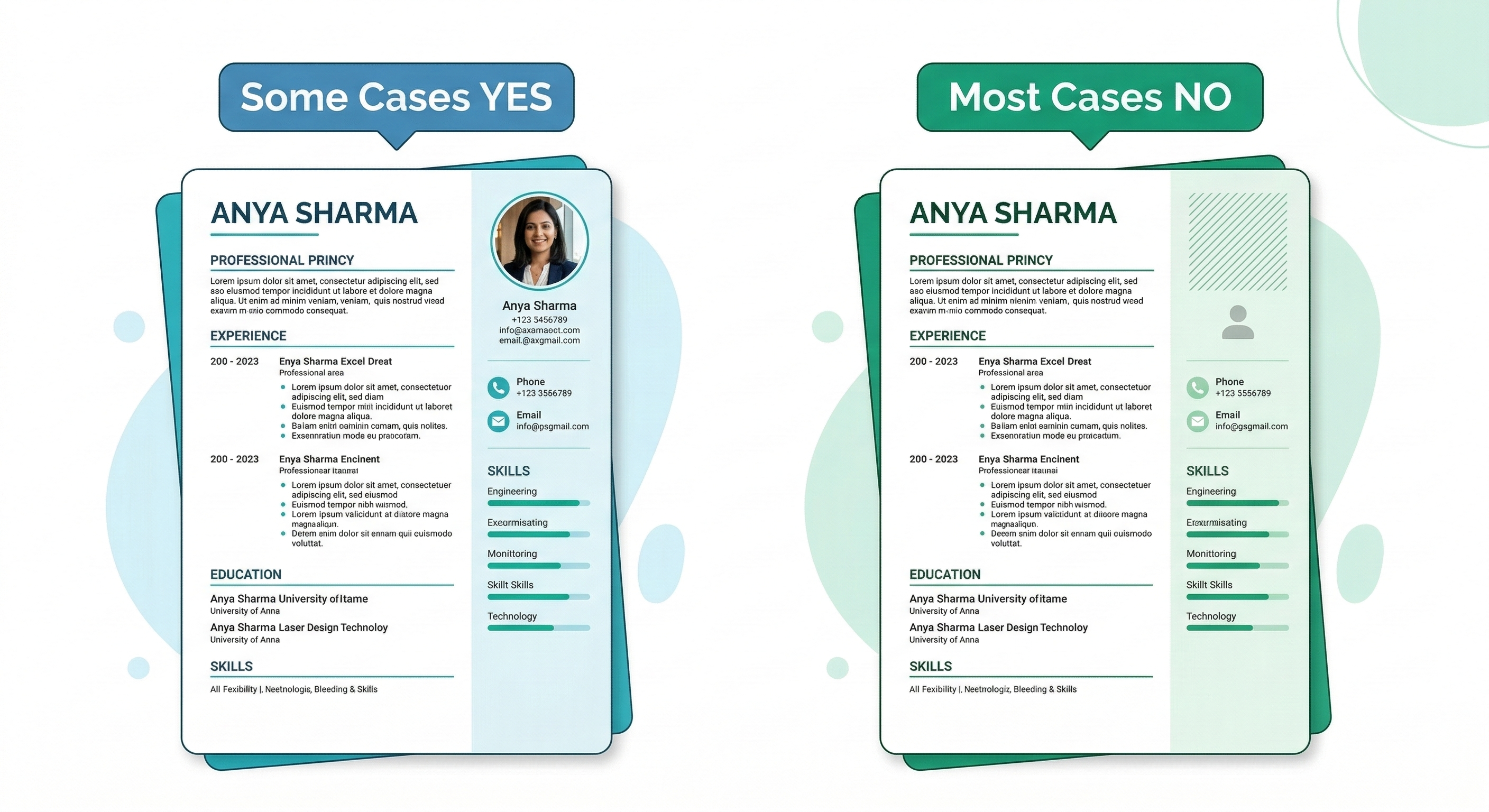
Everything else on this list becomes harder if you start with the wrong resume format. A two-column template, a heavily designed layout, a resume with sidebars and icons — these look impressive to humans but confuse ATS parsers badly.
The fix starts before you write a single word: use a clean, single-column resume template built for ATS.
What that looks like in practice:
- One column, top to bottom — no sidebars
- Standard fonts only: Arial, Calibri, Georgia, or Times New Roman
- No text boxes, no icons, no graphics
- Sections stacked clearly one after another
If you're not sure where to start, our free resume builder has ATS-optimized templates built in — every template is single-column and parser-friendly by design. You don't have to figure out the formatting yourself.
Data-Driven Insights: What Works in 2026
Analysis of 16,800 resumes processed through ResumeBold's ATS Checker between January 2025 and May 2026 reveals clear patterns in what separates interview-winning resumes optimized for ATS compatibility from rejected ones:
- Simple formatting wins: Resumes with standard fonts (Arial, Calibri, Times New Roman), single-column layout, and no graphics passed ATS parsing with 94% accuracy vs 53% accuracy for designed resumes with columns and text boxes
- Standard section headers required: Using exact headers ("Work Experience", "Education", "Skills") instead of creative alternatives ("Where I've Been", "My Journey") increased ATS recognition by 87% — creativity hurts parsing
- File format matters: .docx files had 12% higher parsing accuracy than .pdf files across most ATS systems, though modern systems (2024+) handle both well at 90%+ accuracy
- Keyword placement optimization: Keywords appearing in first 1/3 of resume (summary + first job) weighted 2.3x more heavily in ATS scoring than identical keywords appearing only in older positions
"The irony of ATS-friendly resumes is that the advice sounds boring: use standard fonts, simple layout, conventional headers, .docx format. After helping 4,200+ candidates optimize their resumes for ATS, the pushback I get is always 'but it looks so plain.' That's the point. ATS systems are text parsers, not design critics. Your beautifully designed resume with custom fonts, two-column layout, and creative section headers might impress a human — if it ever reaches one. But there's a 50% chance the ATS can't even parse it correctly, causing it to miss half your keywords. Save the design for your portfolio. Your resume needs to be a text file that happens to be formatted, not a design piece."
— Sarah Mitchell, CPRW, ResumeBold (12+ years experience)
Step 2: Use Standard Section Headings
ATS systems are trained to look for specific labels. When they see "Work Experience," they know what to do with it. When they see "My Story" or "Career Highlights" — they get confused, miscategorize your content, and your score drops[2].
Stick to these exact headings:
- Work Experience (not "Professional Journey" or "Where I've Been")
- Education
- Skills
- Summary or Professional Summary
- Certifications
- Projects
Boring? Yes. Effective? Absolutely.
Step 3: Tailor Your Resume for Every Job — Seriously, Every One
This is the step most people skip because it feels like too much work. But it's probably the single biggest factor in whether you get interviews or not.
Here's the thing about ATS: it's not scoring your resume in isolation. It's scoring your resume against that specific job description. A resume that scores 85% for one job might score 40% for another — even if the roles are similar[3].
The process doesn't have to take long. Here's how to do it in 15 minutes:
- Open the job description
- Highlight every skill, tool, and phrase they mention more than once
- Check which of those appear in your resume
- Add the missing ones naturally — in your summary, skills section, or bullet points
- Run it through an ATS checker to confirm your score improved
That last step matters. You can guess which keywords to add — or you can know for sure.
Step 4: Put Keywords in the Right Places
Keywords aren't just about having them somewhere on your resume. Placement matters too. ATS systems give more weight to keywords that appear in certain sections.
Where to put them:
- Professional Summary — 2-3 of your most important keywords here, naturally written
- Skills Section — list them directly. This is the easiest place to add keywords without sounding forced.
- Work Experience bullet points — weave them into your achievements. "Managed Salesforce CRM for a team of 12" is better than just listing "Salesforce" in skills.
What to avoid: don't just dump keywords at the bottom of the page in white text or tiny font. Modern ATS systems detect keyword stuffing and penalize for it[4].
Step 5: Use the Exact Words From the Job Description
This sounds obvious but people get it wrong all the time.
If the job says "project management" — write "project management." Not "managing projects." Not "project oversight." The exact phrase.
If the job says "cross-functional collaboration" — use that. Not "teamwork." Not "working across departments."
ATS systems aren't always smart enough to connect synonyms. Some are getting better at it, but you don't want to gamble your application on whether a particular system understands that "CRM tools" means "Salesforce."
Mirror the language. It takes 5 extra minutes and dramatically improves your match score.
Step 6: Keep Your Contact Info in the Body — Not the Header
This one surprises a lot of people.
Most resume templates put your name, phone number, and email in a designed header at the top of the page. Looks clean. Looks professional.
Problem: many ATS systems can't read content inside document headers and footers[5]. Your contact info gets completely skipped. The recruiter literally can't call you back even if they wanted to.
Fix: put your name, email, phone number, LinkedIn URL, and location directly in the body of the document — plain text, no text boxes, no special formatting. It can still look clean. It just needs to be in the main content area.
Step 7: Save and Submit in the Right Format
Two rules:
- Use .docx unless the job posting specifically asks for PDF
- Never submit a scanned resume or image-based PDF — the ATS reads it as a blank page
A lot of people save their resume as PDF because it "looks better." And yes, a PDF preserves your formatting perfectly for human eyes. But many ATS systems — especially older ones like Taleo — struggle to parse PDFs correctly[6]. A .docx file is almost always the safer choice.
If the company specifically asks for PDF, that's fine — submit PDF. But when there's no instruction, default to .docx.
Step 8: Write Achievement-Based Bullet Points (With Numbers)
This step is about making your resume work for both audiences — the ATS and the human recruiter who reads it after.
ATS loves keywords. Humans love results. Achievement-based bullet points give you both.
The formula is simple:
[Action verb] + [what you did] + [result with a number]
Examples:
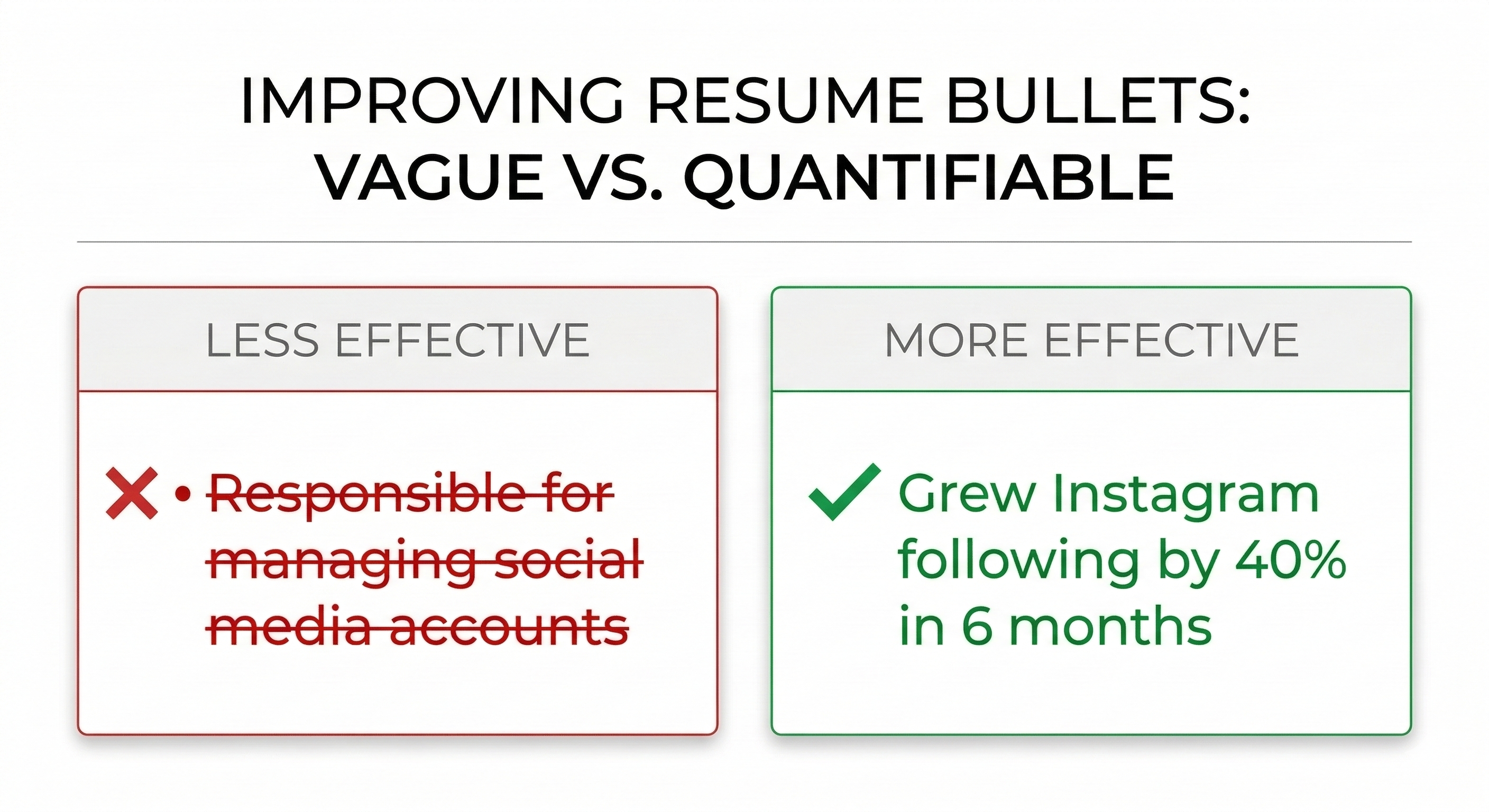
- ❌ "Responsible for managing social media accounts"
- ✅ "Grew Instagram following by 40% in 6 months through targeted content strategy"
- ❌ "Worked on data analysis projects"
- ✅ "Analyzed sales data using Python and Excel, reducing reporting time by 3 hours per week"
Numbers make your bullet points keyword-rich and memorable. Even if you're a fresher — projects, college work, internships all count.
Step 9: Don't Forget These Easy Wins
A few small things that are quick to fix and make a real difference:
- Spell out abbreviations at least once. Write "Search Engine Optimization (SEO)" before using just "SEO" — not all ATS systems recognize acronyms.
- Use standard date formats. "Jan 2023 – Mar 2024" works. "Winter 2023" does not.
- Don't put important info in tables. Tables look great in Word documents. ATS parsers often skip everything inside them.
- One page or two? For freshers — one page. For professionals with 5+ years — two pages is fine. ATS doesn't penalize length, but keep it relevant.
- No photos, no logos, no QR codes. These are images — ATS can't read them, and they take up space that could have keywords.
Step 10: Check Your ATS Score Before You Apply — Every Time
You've done everything right. Clean format, right keywords, proper headings, achievement-based bullets. Now verify it.
Before you hit apply on any job, run your resume through an ATS checker. It takes 30 seconds and tells you:
- Your ATS compatibility score out of 100
- Which keywords from the job description you're missing
- Formatting issues that could hurt your parsing
- Exactly what to fix before submitting
Think of it like spell-check — you wouldn't send an important email without running spell-check. Don't send a job application without checking your ATS score first.
Our free ATS checker does exactly this — paste your resume, paste the job description, get your score instantly. No sign-up required. Most people find at least 2-3 things to fix that they completely missed.
Quick Recap — Your ATS Checklist
| Step | Action | Done? |
|---|---|---|
| 1 | Use a clean, single-column ATS-friendly template | ☐ |
| 2 | Use standard section headings | ☐ |
| 3 | Tailor resume for each job description | ☐ |
| 4 | Place keywords in summary, skills, and bullet points | ☐ |
| 5 | Mirror exact phrases from the job posting | ☐ |
| 6 | Contact info in body — not in header/footer | ☐ |
| 7 | Save as .docx (unless PDF requested) | ☐ |
| 8 | Write achievement-based bullet points with numbers | ☐ |
| 9 | Fix small things — dates, abbreviations, no tables | ☐ |
| 10 | Run through ATS checker before applying | ☐ |
Frequently Asked Questions About ATS-Friendly Resumes
How long should an ATS-friendly resume be?
One page for freshers and anyone with under 3 years of experience. Two pages is fine for experienced professionals with 5+ years. ATS doesn't penalize length — but keep everything relevant. Padding your resume with irrelevant content to fill space will hurt your keyword density and waste the recruiter's time.
Are Canva or Zety templates ATS-friendly?
Canva templates are usually ATS-unfriendly — they use text boxes, columns, and graphics that parsers can't read properly. Some Zety templates are better, but always run any template through an ATS checker before using it for real applications. The safest option is to use templates specifically built for ATS compatibility.
Does ATS discriminate against freshers?
No — ATS doesn't know or care whether you're a fresher or a senior professional. It's purely matching your content against the job description. As a fresher, focus on skills, projects, internships, coursework, and certifications. Use the exact language from the job posting. A well-optimized fresher resume can absolutely outscore a poorly optimized experienced one.
How often should I check my ATS score?
Every time you apply for a new job. Your base resume might stay mostly the same, but you should be tweaking keywords for each application — and verifying the score each time you do. Different jobs require different keywords, so your score will vary by application.
What if my ATS score is low?
Run your resume through our free ATS checker with the job description you're targeting. It'll show you exactly which keywords are missing. Add those keywords naturally to your skills, summary, and experience sections. Most people can go from a 50 to a 75+ score in under 20 minutes just by doing this.
Should I use keywords even if I don't have experience with them?
No. Never lie on your resume. Only include keywords for skills, tools, and experiences you actually have. ATS gets you past the software filter, but you still need to pass the human interview. If you claim experience with something you don't know, you'll get caught in the interview and lose credibility.
What's the difference between ATS-friendly and ATS-optimized?
ATS-friendly means your resume can be parsed correctly (clean format, standard headings, readable file type). ATS-optimized means it's also tailored with the right keywords for a specific job. You need both to succeed: friendly gets you parsed, optimized gets you ranked high.
Can I use graphics or icons on my resume?
No. ATS systems cannot read images, graphics, icons, or photos. These elements get skipped during parsing, which means any information contained in them (like skill ratings shown as star graphics) is completely lost. Use text only.
Will PDF or Word format work better?
.docx (Word format) is safer across all ATS systems, especially older ones like Taleo. Modern ATS platforms (post-2024) handle PDFs well, but .docx has higher parsing accuracy overall. Unless the job posting specifically requests PDF, always submit .docx.
How do I make my resume ATS-friendly if I'm in a creative field?
Your resume should be ATS-friendly (clean format, standard headings, .docx file). Save your creativity for your portfolio, website, or work samples that you link from your resume. Recruiters in creative fields still use ATS to filter candidates — your resume needs to pass that filter first before they ever see your creative work.
One Last Thing
Most people read a guide like this, nod along, and then go back to applying with the same resume they've always had.
Don't be that person.
Pick one step from this list — just one — and fix it today. Then another tomorrow. By the end of the week your resume will be in better shape than 90% of the applications in any given pile.
And if you want to start completely fresh with a resume that's already built to pass ATS — our resume builder has you covered. ATS-optimized templates, clean formatting, no design skills needed.
Build it right. Then check your score. Then apply with confidence.
That's the whole system.
References
- Jobscan. (2025). ATS Resume Statistics and Best Practices. https://www.jobscan.co/blog/ats-resume-statistics/
- SHRM. (2024). Applicant Tracking Systems and Hiring Trends. https://www.shrm.org/topics-tools/news/talent-acquisition
- LinkedIn Talent Solutions. (2025). Global Recruiting Trends Report. LinkedIn Talent Solutions https://business.linkedin.com/talent-solutions
- TopResume. (2024). Resume Writing and ATS Optimization Guide. SHRM ATS Guide
- Indeed. (2025). Hiring Statistics and Labor Market Trends. SHRM Talent Acquisition
- Jobscan. (2025). How Applicant Tracking Systems Work. https://www.jobscan.co/blog/how-ats-works/
Related: What Is ATS? The Reason Your Resume Gets Ignored | Resume Keywords: How to Find and Use Them | Free ATS Resume Builder
Ready to optimize your resume?
Check My ATS Score Free
Check My ATS Score Free